
Trading
With routing powered by Jupiter, BONKbot is the fastest way to buy, sell, and manage your trades – keeping you in control.

- Trade any SPL token
- Optimal routing with Jupiter
- Token2022 Support
- All Fees Buyback Bonk
- Referral Programme
- New Token Alerts
- Full Mobile Support
- No Clunky Web UI
- Trade Visualization
Make More Money Trading with Solana’s Fastest Telegram Bot
Trading Guide
Trading in Solana is cost effective in comparison to ETH(Ethereum). Each trade(buying or selling) will cost around 1% of the transaction whereas ETH fees, also known as GAS fees are high when the Ethereum Blockchain is experiencing high demand.
Luno:
ONCE OFF:
1. Download from Google Playstore or Apple App store.
2. Set up your account.
3. Verify your account with ID, etc.
4. Link your bank account to deposit and withdraw funds.
TRADING:
1. Add Fiat funds and buy some SOLONA.
2. Send the SOLANA to your BonkBot Wallet Address to start trading on BonkBot.
DEXSCREENER:
The following link is set to the correct filter to show Solana meme coins by new pairs which makes it trading brand new pairs quite simple:
Good Coin Checklist:
1. Coin is less than 10 min old and is on SOL chain. You can trade older coins but take note of the profit and loss over the last 5 min, 1 hour and 6 hour mark. If the coin has 1000% over the last hour, it would need to reach 2000% for you to double your trade. For example $10 to $20 or R100 to R200.
2. Coin has an icon is a good start.
3. Liquidity must be locked(green lock icon)
4. Are socials added? If they are that means the owner of the coin paid the Dexscreener fee to list their coin. Great! Scammers usually don’t pay this fee and their website, twitter and telegram links will be blank.
5. Use rugcheck.xyz website to check if coin status is good.
Bonkbot:
INSTALL on TELEGRAM: BonkBot
Follow the onscreen instructions.
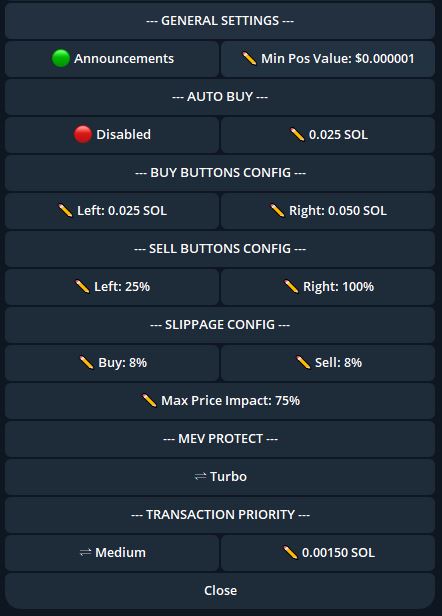
Once joined and setup change settings using /settings command. SEE IMAGE BELOW – you can use your own values but please do your research by reading their documentation before making crucial changes:
ONE TIME CONFIG:
1. Enter /start and click wallet.
2. Export secret phrase to use on Phamtom Wallet (this is only to view your total wallet value. You can swap coins on Phamtom Wallet but rather use the BonkBot on Telegram, it’s quick and easy.
TRADING:
1. Paste the coin address into the BonkBot Chat and it will give you buy options.
2. You just click the left or right button for the amount you want or BUY X SOL to put your own amount.
3. A coin interface will become available once a trade is successful. Click refresh to see Profit and Loss percentage for the coin.
4. Wait till the coin reaches the desired profit. For example – 25% or 1.25x, 50% or 1.5x your initial buy from the time you purchased then SELL.
DON’T WAIT TOO LONG, YES SOME COINS REACH 10000% or more but in most cases you’re going to end up losing unless your comfortable taking the risk for long term, but 99% of meme coins won’t make into the top 1000 market cap.
Phamtom Wallet (optional – only used to view all the coins you currently own and a total net worth value):
1. Download from the Google Playstore, Apple App Store or add it to your browser extension.
2. Complete normal setup which gives you a Phamtom Wallet address(YOU CAN’T USE THIS ONE FOR THE TRADING THOUGH)
3. Add your exported BonkBot secret phrase when adding a new account.
4. You can rename your wallet accounts so you know which one is which.
StakeBot supports responsible gambling. No persons under the age of 18 years are permitted to gamble. Winners know when to stop. South African Responsible Gambling Foundation toll-free counselling line: 0800 006 008.